Next generation industrial automation

Web SCADA system
for your production

Monitoring, control and automation of technological processes in real time. Supports all major PLC protocols, visual circuit editor and built-in AI assistant.
14+
Device types
5
PLC protocols
Real-time
Monitoring
https://scada.example.com/dashboard
OBJECTSCADA Dashboard
Scroll down
Platform capabilities

Everything you need for
industrial automation

Full-featured SCADA platform with a single interface for monitoring, controlling and analyzing technological processes.

Real-time monitoring

WebSocket connection provides instant data update. TimescaleDB stores time series with nanosecond precision.

WebSocketTimescaleDBRedis

Visual schematic editor

Drag-and-drop flow chart editor based on Konva.js. Create interactive mimic diagrams with animation of device states.

Konva.jsSVGDrag & Drop

Accident management

Multi-level alarm system with priorities. Event log, acknowledgment, escalation of notifications. History of emergency situations.

AlarmsHandshakeNotifications

Trends and data history

Plotting historical data graphs with scaling. Export to Excel, CSV. Comparison of several parameters on one graph.

Chart.jsExcelTimescaleDB

Sequences and recipes

Visual programming of technological sequences. Management of recipes, stages and batches (batch automation).

BatchRecipesAutomation

Role-based access model

Flexible RBAC system: operators, engineers, administrators. User activity log. JWT authentication.

RBACJWTAudit

Multilingual interface

Full localization via i18next. RTL (Arabic) support. Switch language without reloading the page.

i18nextRTLLocalization

Docker deployment

Full containerization via Docker Compose. One file - the entire stack: backend, frontend, database, Redis, PLC worker.

DockerPostgreSQLRedis
Industrial protocols

Support for everyone
key PLC protocols

Connect any industrial equipment without modification - the system supports standard protocols out of the box.

S7

Siemens S7

Siemens

Snap7 + TIA Openness

Full support for S7-300/400/1200/1500. Read/write variables DB, M, I, Q. Integration with TIA Portal for automatic configuration deployment.

MOD

Modbus

Universal

RTU / TCP / ASCII

Modbus RTU via RS-485/RS-232 and Modbus TCP/IP. Supports all function codes: Coils, Discrete Inputs, Holding Registers, Input Registers.

MQTT

MQTT

IoT

Broker / Client

IoT device protocol. Subscribe to topics, publish commands. Compatible with Mosquitto, HiveMQ, AWS IoT Core. QoS 0/1/2.

OPC

OPC UA

IIoT

Client / Server

Industry standard IIoT. Secure data exchange with any OPC UA-compatible equipment. Support Node ID, Browse, Subscription.

EIP

EtherNet/IP

Rockwell

Allen-Bradley / Rockwell

CIP protocol for Allen-Bradley PLCs. Supports ControlLogix, CompactLogix, MicroLogix. Tag reading, diagnostics.

Technical overview

Modern
microservice architecture

Each component is optimized for its task - from the UI to the highly loaded Rust worker that works directly with the hardware.

Browser/Client
React 18 + TypeScript
SPA operator interface
MUI + Konva.js
UI components and diagrams
Redux Toolkit
State Management
WebSocket Client
Real-time updates
Backend API
Django 4.2 + DRF
REST API, business logic
Django Channels
WebSocket server
JWT Auth
Authentication and RBAC
Daphne / Gunicorn
ASGI/WSGI servers
Worker PLC (Rust)
Tokio Async Runtime
High performance worker
Snap7 / Modbus
PLC protocol drivers
MQTT / OPC UA
IoT protocols
Redis PubSub
Broadcast events
Data warehouses
PostgreSQL + TimescaleDB
Main database and time series
Redis
Cache, sessions, PubSub
PgBouncer
Connection pooling
Qdrant
Vector database for AI
AI Service
FastAPI
Asynchronous AI microservice
RAG Pipeline
Retrieval Augmented Generation
SQLAlchemy Async
Access to SCADA data
Qdrant Client
Semantic search
Infrastructure
Docker Compose
Containerization of the entire stack
Nginx
Reverse proxy, static
TIA Agent (.NET)
Siemens TIA integration
Debian ISO
Ready image for installation
Main areas

System
interface

Main application areas: from monitoring and diagrams to equipment and administration.

Monitoring and visualization
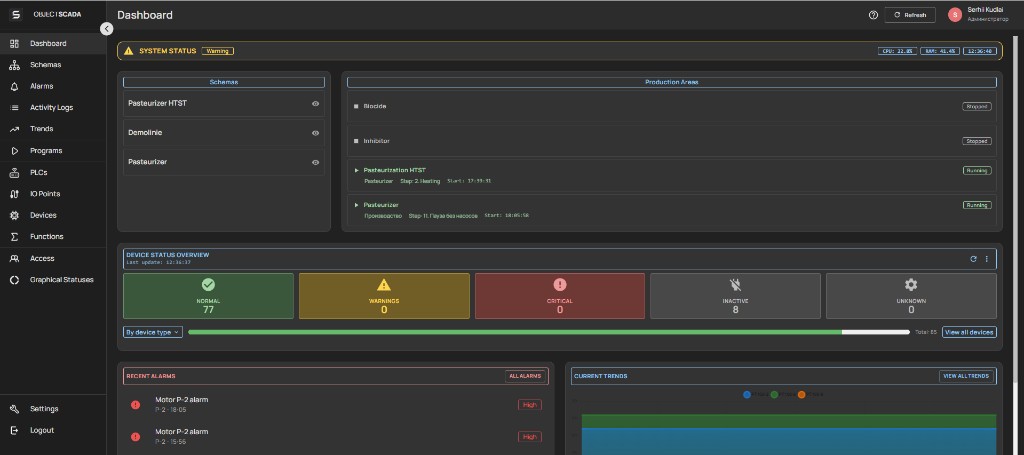
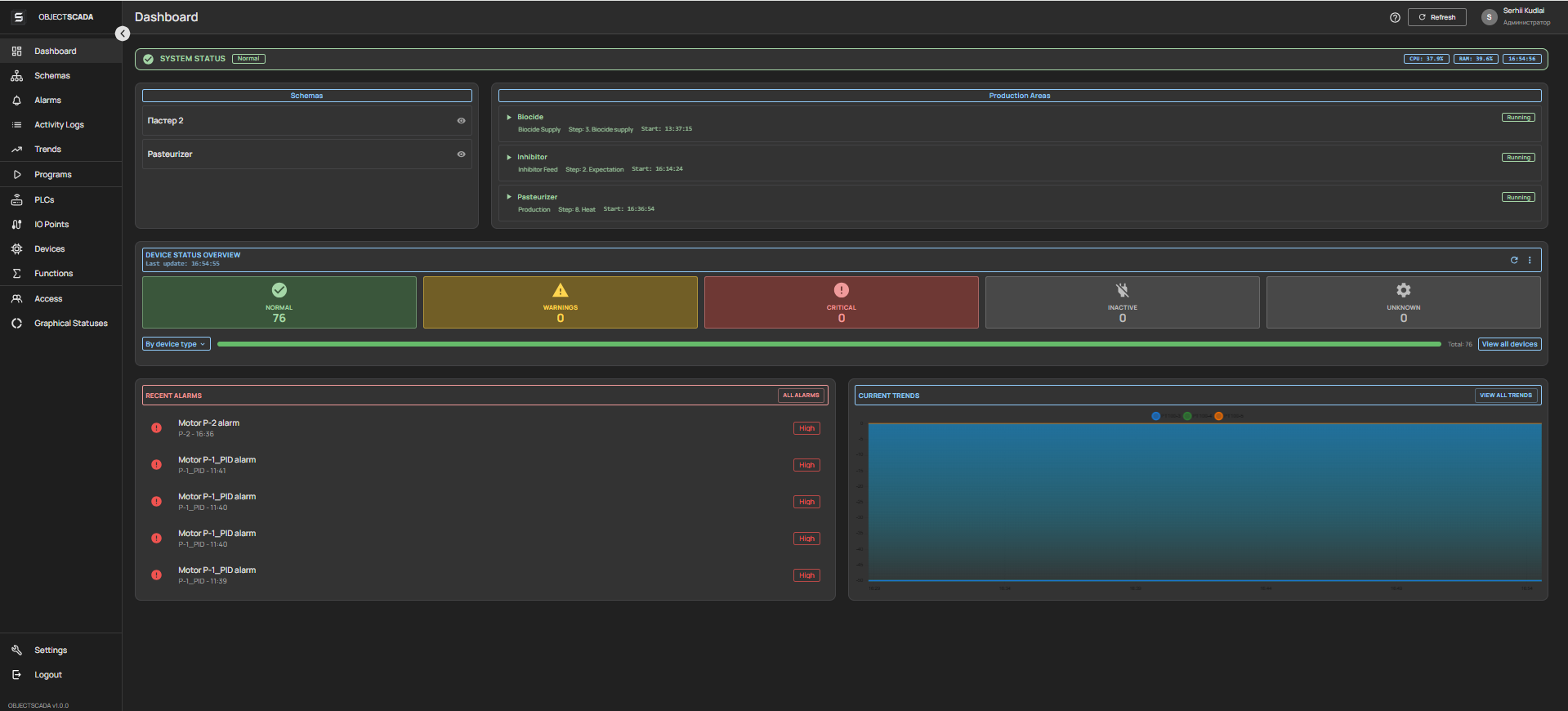
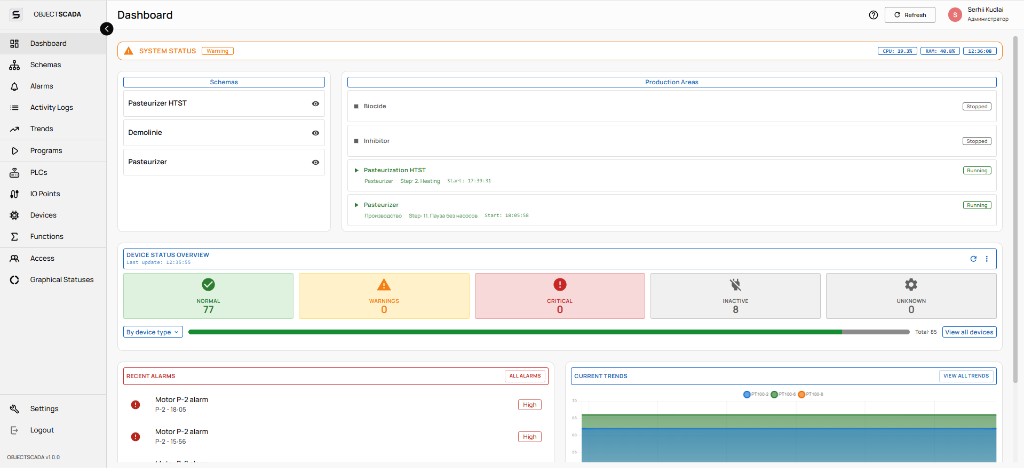
Monitoring dashboard
Home view: KPIs, area status, and a quick process overview
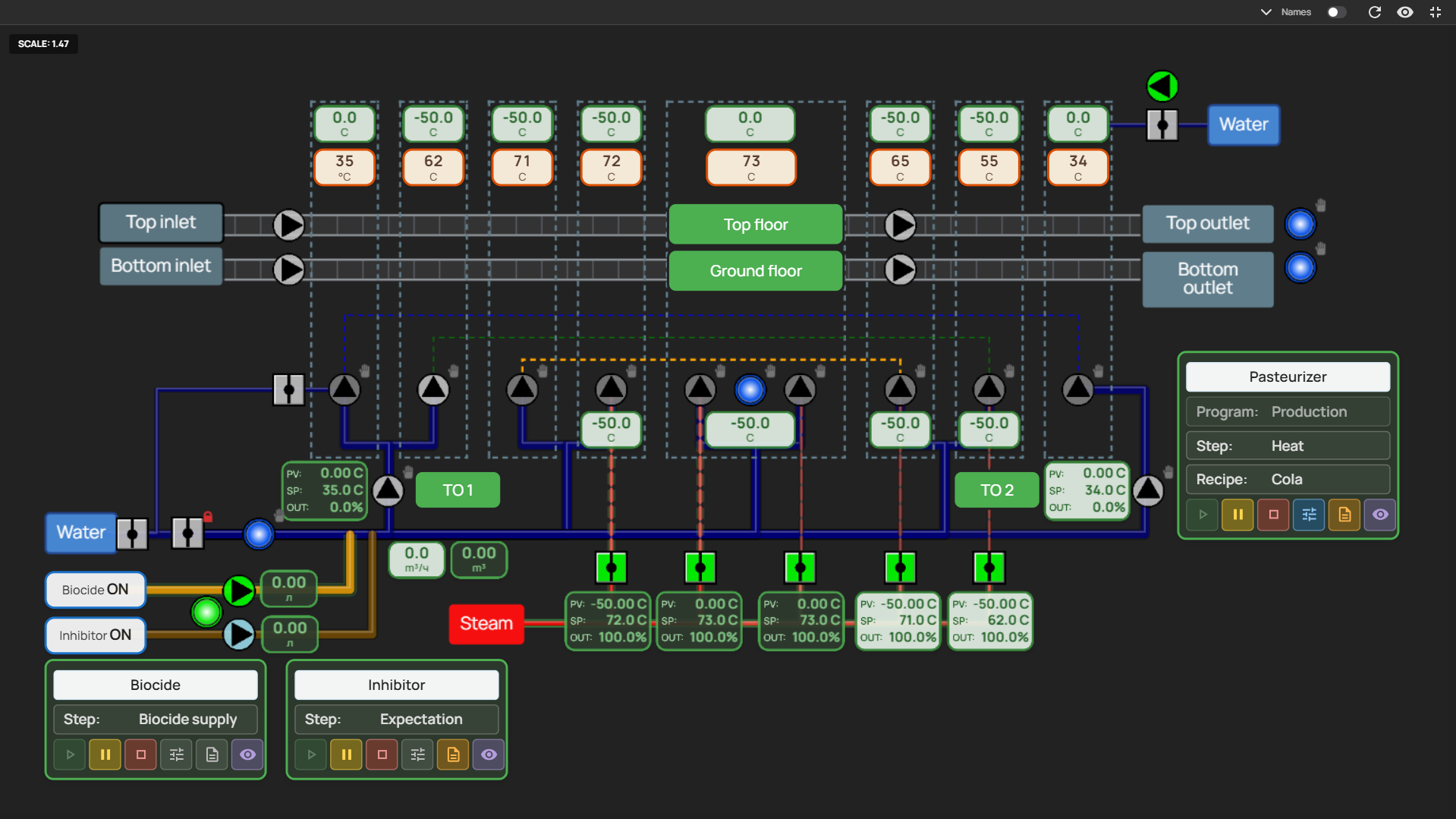
Diagrams
Mimic diagrams: equipment, piping, and links — view and control close to the real process
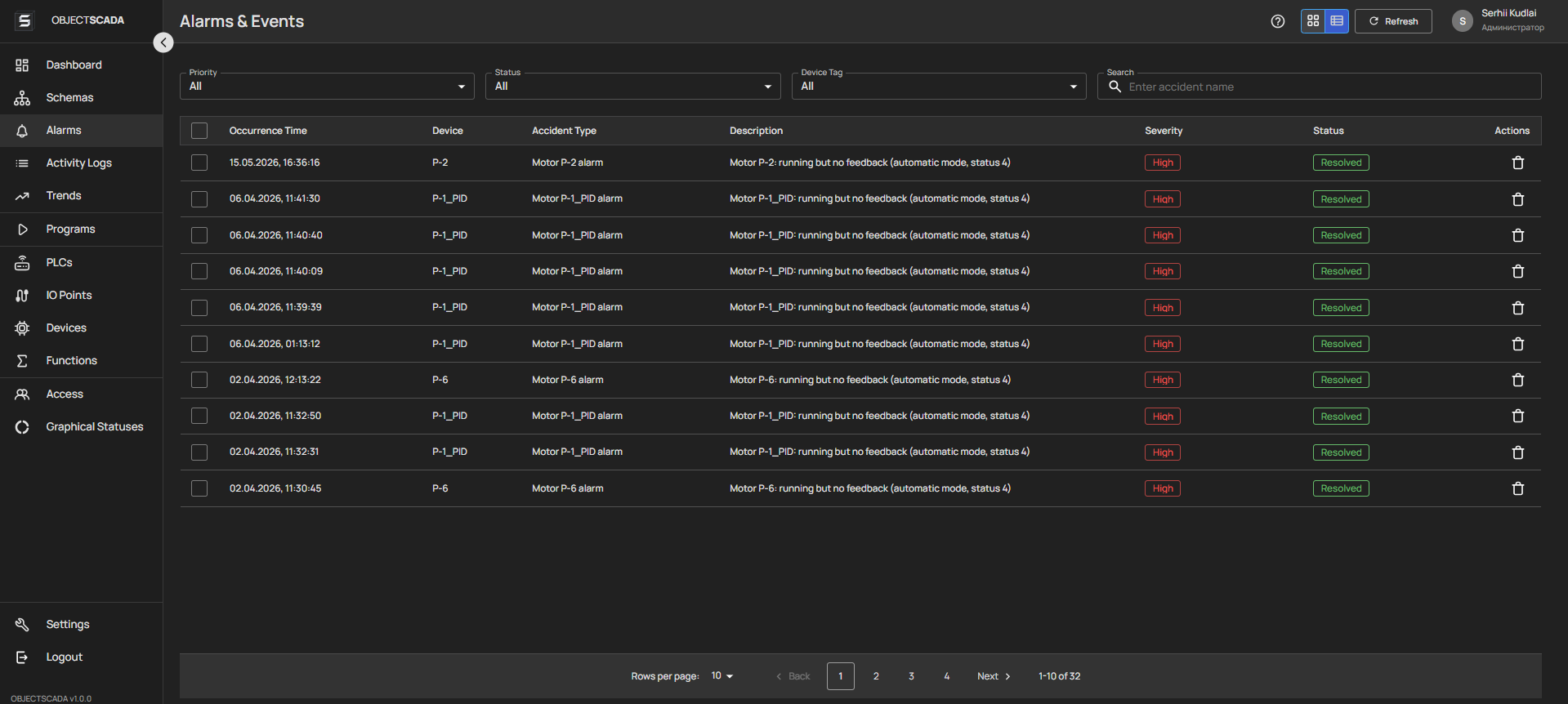
Alarms
Active and cleared alarms and warnings: filtering, acknowledgment, incident history
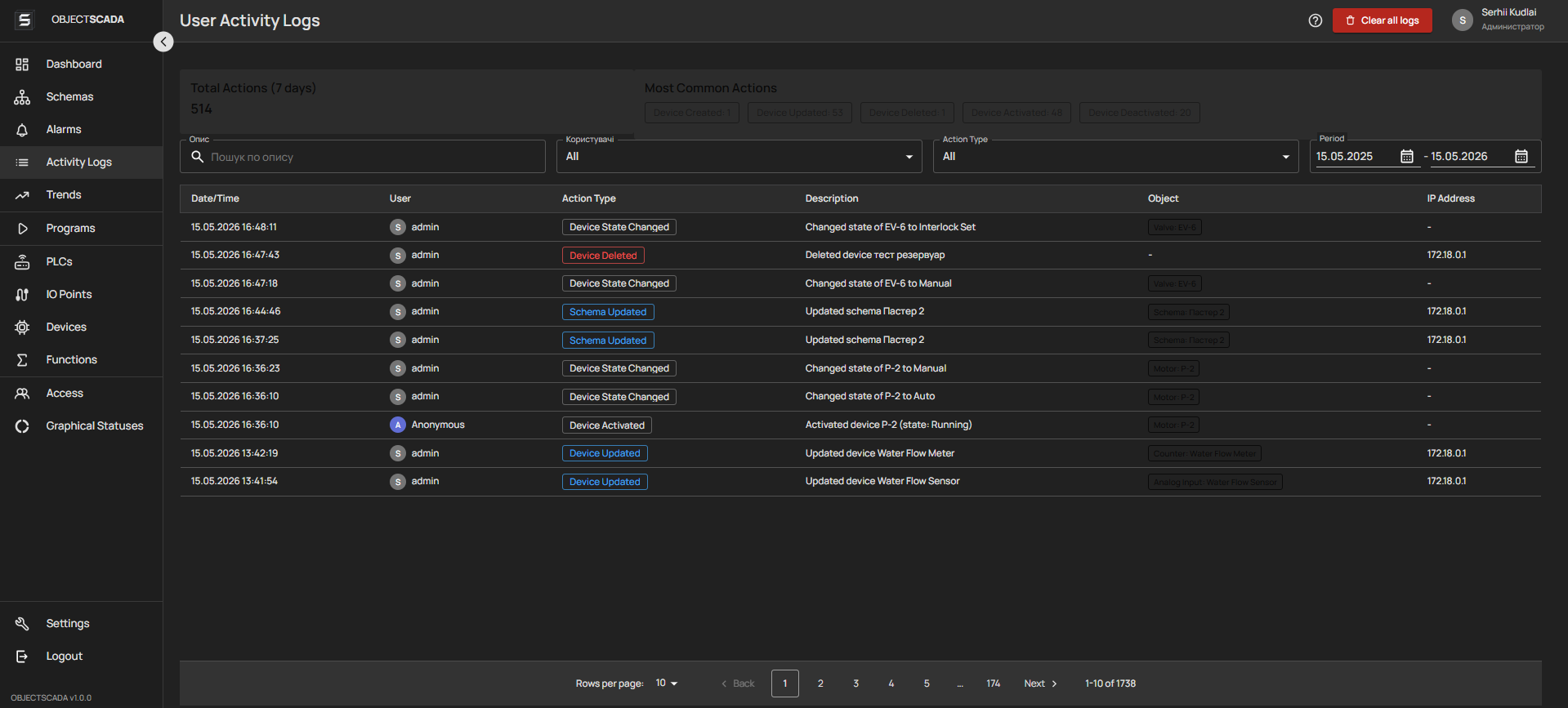
Activity log
Audit trail: who did what and when — for accountability and investigations
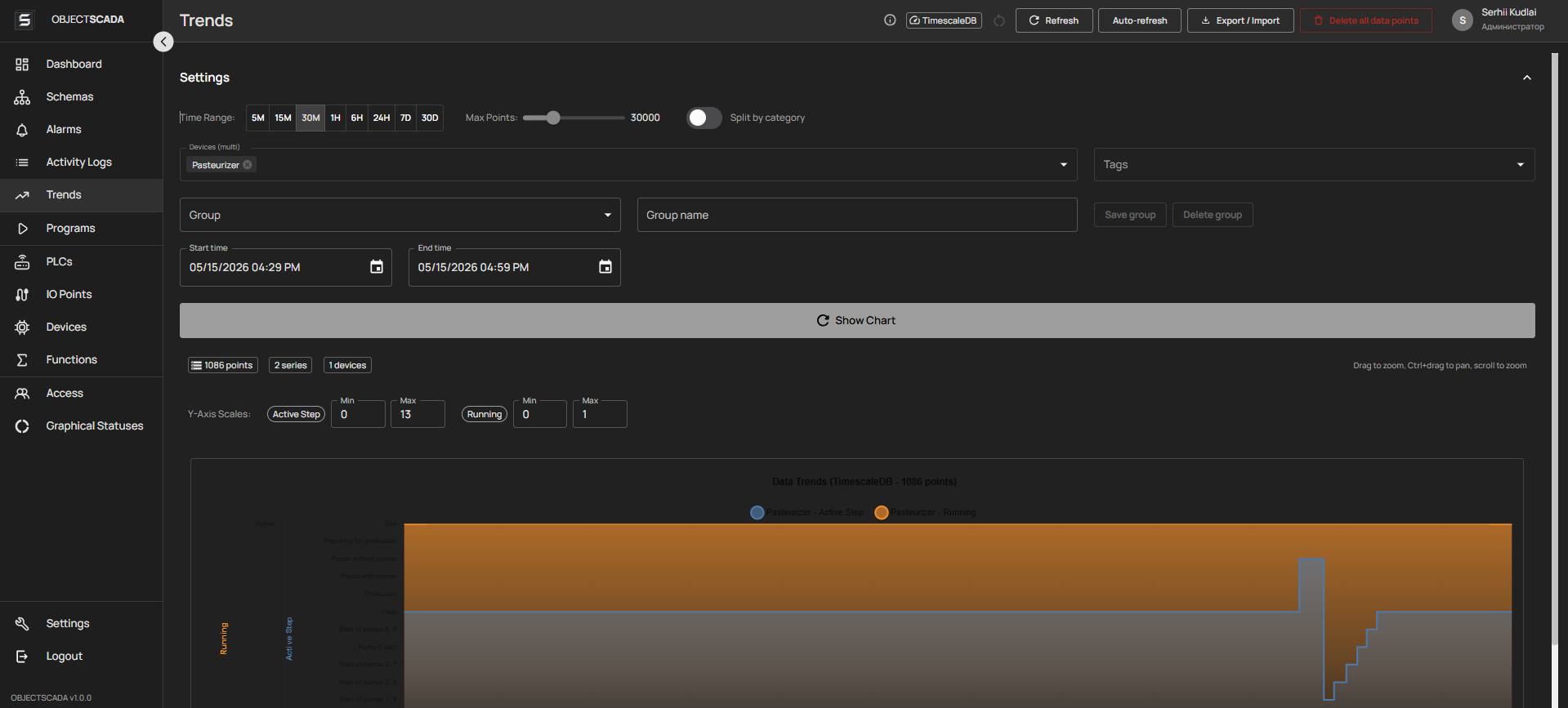
Trends
Trends and archives for selected signals/tags — analyze modes and deviations
Logic and automation
Programs
Automation scenarios — sequences and recipes: start, steps, execution status, binding to lines and areas
Equipment and connectivity
PLCs
Controllers: connection, link status, data exchange settings (Modbus, OPC UA, etc.)
I/O points
Physical inputs/outputs: addressing and signal binding
Devices
Plant objects (pumps, valves, PID, etc.): parameters, modes, binding to I/O and diagrams
Functions
Calculations and signal transformations
Administration
Users
Accounts: access, profiles, lockouts
Roles
Role-based permissions: operator, technologist, administrator, etc.
Graphic states
Equipment state on diagrams: colors and icons (run / stop / alarm)
Settings
General application parameters, license, system information

Data flow

PLC/Hardware Rust Worker Redis PubSub Django Channels React UI
Rust Worker TimescaleDB ←→ Django API ←→ AI FastAPI Qdrant
Approach comparison

Differences from
classic SCADAs

Five practical differences between our web platform and traditional client SCADA.

Access
Via browser — no separate client needed, unified UX on any device.
Stack
Python + React/TypeScript — open source, easy to find developers and integrate custom logic.
Integration
API-first and WebSocket — MES, ERP, cloud, analytics without additional middleware.
Deployment
Docker containers — reproducible environments, predictable deployment, simple maintenance.
PLC engineering
Modbus/OPC UA + code export for Siemens — minimal gap between the SCADA project and the controller code.
Real installations

Project
examples

Screenshots of working SCADA installations at industrial facilities across various industries.

Main Dashboard
1

Main Dashboard

Overview monitoring screen: key KPIs, equipment status, real-time pressure and temperature trends.
Monitoring KPI WebSocket
Process Schematic
2

Process Schematic

Interactive process diagram with animated devices, pipelines and valve states.
Schematic Konva.js SVG
Alarms & Events
3

Alarms & Events

Alarm log with priorities, acknowledgment and history: filtering by zone, time and event type.
Alarms Log Acknowledgment
Trends & Archives
4

Trends & Archives

Historical data on a time scale with zoom, multi-parameter comparison and Excel export.
Trends TimescaleDB Chart.js
Device connections
5

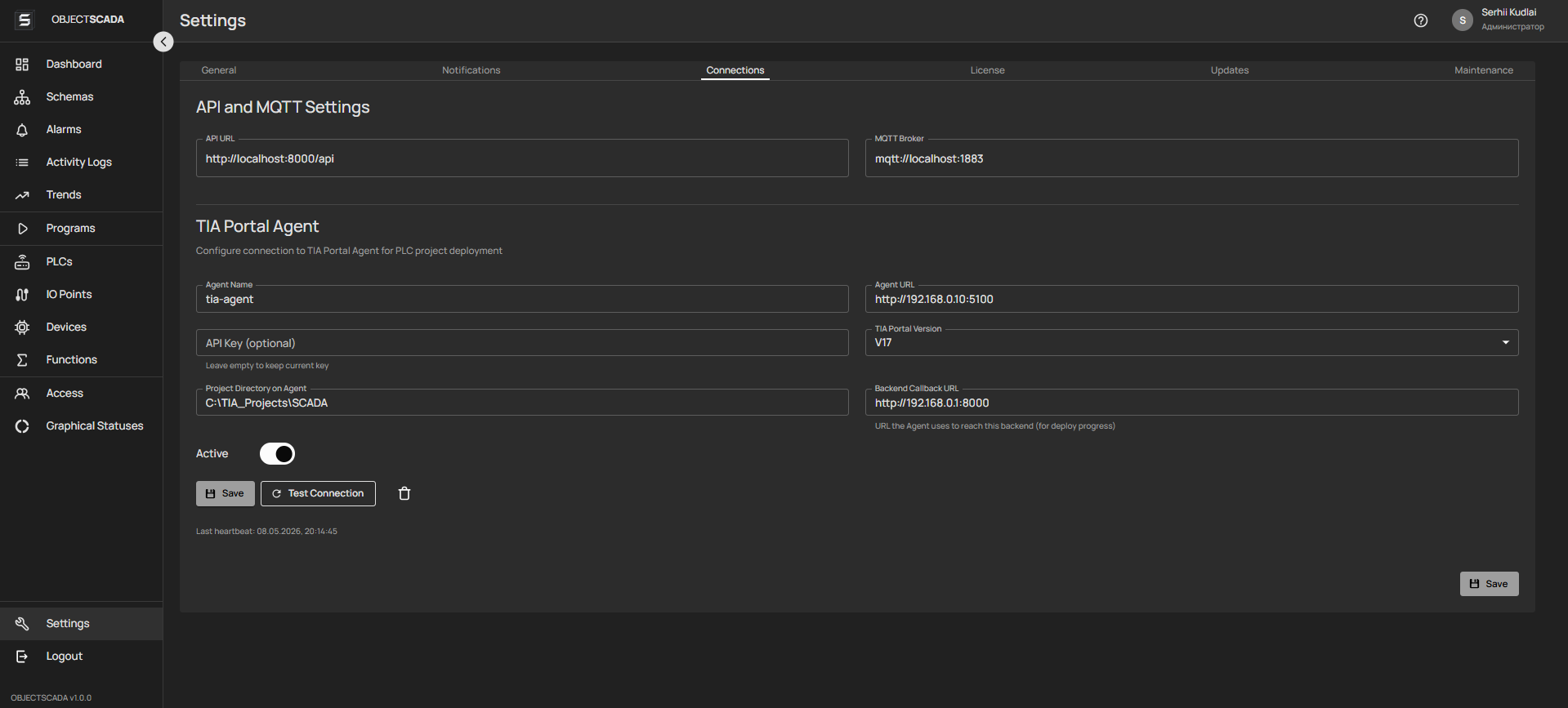
Device connections

Unified view of links to PLCs, OPC servers and field devices: channel status, diagnostics and connection health.
OPC UA Modbus PLC
Action Log
6

Action Log

Operator audit trail: who, when and what was done in the system — for investigations and accountability.

Audit Security RBAC
Contact us

Ready to implement
SCADA at your site?

Contact us to receive demo access, technical advice or estimate the cost of implementation for your company.

Demo access
Test environment with real data for system evaluation
Pilot project
Implementation on one site with subsequent scaling
Technical consultation
Assess compatibility with your equipment and PLC

Leave a request

By clicking the button, you agree to the processing of personal data